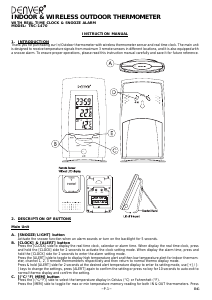
Käyttöohje Denver TRC-1470 Sääasema

Tarvitsetko käyttöoppaan Denver TRC-1470 Sääasema? Alta voit katsoa ja ladata suomenkielisen PDF-oppaan ilmaiseksi. Tällä tuotteella on tällä hetkellä 5 usein kysyttyä kysymystä, 0 kommenttia ja 0 ääntä. Jos tämä ei ole haluamasi käyttöopas, ota meihin yhteyttä.

Onko tuotteessa vika, eikä käyttöoppaasta ole apua? Siirry Repair Café ‑alueelle etsimään ilmaisia korjauspalveluita.

Käyttöohje

Loading…
~P.3~
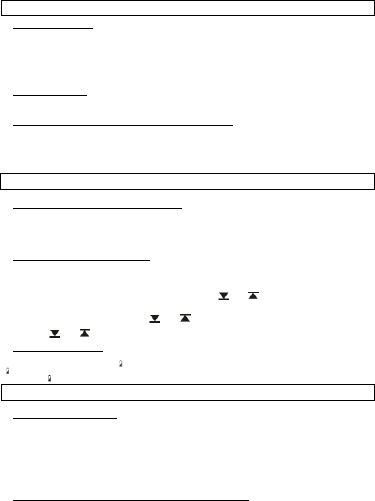
g. Month digits will flash. Press [ + ] or [ - ] button to set your desired month. Press [CLOCK] button to confirm. Do the
same to set Date.
5.
HOW TO SET ALARM
a. In clock time display mode, press [CLOCK] button twice to display alarm time for 10 seconds.
b. Press [-] button in alarm display mode to arm or disarm the daily alarm.
c. Press and hold [CLOCK] for 2 seconds to enter the alarm setting mode.
d. The hour digit will flash, use [+] button to increase by one hour or [-] button to decrease by one hour to your desired
hours. Hold down the button will change the increment rapidly. Press [CLOCK] button to confirm.
e. The minute digits will flash. Use [+] button to increase by one minute or [-] button to decrease by one minute to your
desired minutes. Hold down the button will change the increment rapidly. Press [CLOCK] button to confirm and finish the setting.
6.
SNOOZE FUNCTION
The alarm will go off for one minute, press any button (except [SNOOZE] button) will stop the alarm. If [SNOOZE] button
is pressed, the snooze function will be triggered and the alarm will stop for 5 minutes.
7.
HOW TO DISPLAY DIFFERENT OUTDOOR TEMPERATURES
a. You can select the temperature shown in Celsius or Fahrenheit by pressing the [(°C/°F)] button.
b. The main unit is designed to receive RF signals from maximum 3 RF remote sensors. Pressing the [CHANNEL] button
will change the temperature display from one sensor to another.
c. This device is equipped with an auto-scroll function. While the auto-scroll function is set, the unit will automatically cycle
to display the temperature of each remote sensor for 4 seconds. To enable auto-scroll function, use CHANNEL button
to toggle channel 1,2,.,. until auto scroll icon appears beside the channel indicator.
8.
HOW TO DISPLAY MAX/MIN TEMPERATURE
a. The main unit records the maximum and minimum value of both indoor and outdoor temperature.
b. Press the [MEM] button once to read the minimum temperature of indoor temperature, press it again for the maximum
temperature of indoor temperature. Press the [MEM] button continuously to view the minimum or maximum tempera-
ture of all 3 remote sensor one by one.
c. To erase the max/min temperature record, press and hold [MEM] button for 3 seconds.
9.
HOW TO SET TEMPERATURE ALERT
a. Press [ALERT] key to your desire upper/Hi or lower/Lo temperature alert for designated IN or REMOTE thermo at the
desirable channel;
b. Press and hold the [ALERT] key for 2 seconds, the corresponding display digits start blinking;
c. Use the [+] & [-] keys to change for your desired setting;
d. Press [ALERT] key to confirm setting and exit the setting mode. (“
” or “ ” icon appears to indicate the Hi or Lo
alert is armed)
e. Auto-exit the temperature alert display and returns to current temperature display mode after 10 seconds. (Hi-Lo
temperature limit icon disappears; leaving “
” or “ ” icon to indicator alert is armed.)
f. To disarm the temperature alert – go to the desired temperature alert display mode, press [-] key once to disable the
alert, the “
” or “ ” icon disappears.
10.
BATTERY INDICATORS
The main unit comes with battery level detectors, it will continuous monitor the battery level of both the main unit and the
RF remote sensor(s). There are two “
“ low battery level icons, when low battery level of the main unit is detected, the
“ icon will be displayed on the indoor temperature segment of the screen. If low battery level of any remote sensor is
detected, the “
“ icon will be displayed on the outdoor temperature segment of the corresponding remote sensor channel.
11.
THE HOLD SEEK FUNCTION
In order to have a quick re-registration of remote sensor, it is recommended to activate the hold seek function before
replacing batteries of any remote unit.
a. Press and hold the [CHANNEL] button for 3 seconds to activate the hold seek function.
b. The main unit will temporary stop seeking signal from the corresponding remote sensor and waiting for new signal
registration.
c. Once the batteries have been replaced, the remote unit will start to transmit signal to the main unit again and the main
unit will automatically set the new signal back to its previous channel. With this hold seek function, there is no need to
reset the main unit or proceed the whole registration procedures again when batteries of any remote unit have to be
replaced.
12.
RF REMOTE SENSOR WITH DETACHABLE PROBE (OPTIONAL)
a. In order to avoid freezing up of battery, when the outdoor temperature is below 20°C, open the side cover of the RF
remote sensor and insert the probe plug. Extend the 6 feet probe cord, leave the probe sensor outdoor and place the
remote sensor unit indoor.
NOTE: If the main unit idles for 8 seconds during setting, it will exit the setting mode and return to normal display.
Note: If the channel has no registered remote sensor, the device will display ‘—.-C‘ in the channel display.
NOTE: The main unit and the RF remote sensor contains no user-serviceable parts.
ENG
Lataa käyttöohje suomalainen (PDF, 0.54 MB)
(Mieti ympäristöä ja tulosta tämä käyttöopas vain, jos se on todella tarpeen)

Loading…

Arviointi

Kerro meille mielipiteesi Denver TRC-1470 Sääasema arvioimalla tuote. Haluatko jakaa tuotekokemuksesi tai kysyä kysymyksen? Jätä kommentti sivun alalaidassa.
Oletko tyytyväinen kohteeseen Denver TRC-1470 Sääasema?
Kyllä Ei
Arvostele tuote ensimmäisenä
0 äänet

Keskustele tuotteesta

Täällä voit jakaa mielipiteesi Denver TRC-1470 Sääasema:sta. Jos sinulla on kysyttävää, lue ensin huolellisesti käyttöohje. Käsikirjaa voi pyytää yhteydenottolomakkeellamme.

Lisää tästä ohjekirjasta

Ymmärrämme, että on mukavaa, että sinulla on paperikäyttöinen käyttöopas laitteellesi Denver TRC-1470 Sääasema. Voit aina ladata oppaan verkkosivuiltamme ja tulostaa sen itse. Jos haluat alkuperäisen käyttöoppaan, suosittelemme ottamaan yhteyttä osoitteeseen Denver. He saattavat pystyä toimittamaan alkuperäisen ohjekirjan. Etsitkö laitteen Denver TRC-1470 Sääasema käyttöopasta toisella kielellä? Valitse haluamasi kieli kotisivuiltamme ja etsi mallinumero nähdäksesi, onko sitä saatavilla.

Tekniset tiedot

Tuotemerkki Denver
Malli TRC-1470
Kategoria Sääasemat
Tiedostotyyppi PDF
Tiedoston koko 0.54 MB

Kaikki käsikirjat kohteelle Denver Sääasemat
Lisää Sääasemat käsikirjoja

Usein kysytyt kysymykset kohteesta Denver TRC-1470 Sääasema

Tukitiimimme etsii hyödyllisiä tuotetietoja ja vastaa yleisiin kysymyksiin. Jos huomaat yleisissä kysymyksissä virheen, kerro siitä meille yhteydenottolomakkeella.

Sääasemani ennusti, että alkaisi sataa, mutta niin ei käynyt. Mistä se johtuu? Todennettu

Sääaseman ennustus perustuu ilmanpaineeseen. Yleensä matalapaine merkitsee huonoa säätä ja korkeapaine hyvää säätä. On mahdollista, että sääolot kehittyivät eri tavalla kuin ilmanpaine ennusti.

Tästä oli apual (1468) Lue lisää

Mikä on paras sääaseman ja sen antureiden sijainti? Todennettu

Itse sääasema on sijoitettu sisälle, ja se on pidettävä poissa lämmönlähteistä, kuten keittiöstä, ikkunoista tai sähkölaitteista. Erillinen ulkolämpötila-anturi on sijoitettava varjoon ja vähintään 1,25 m maanpinnan yläpuolelle. Sadetunnistin on sijoitettava avoimelle alueelle, jossa se voi aina kerätä sadetta. Tuulianturi on sijoitettava myös avoimelle alueelle, tuulen mahdollisten esteiden kanssa.

Tästä oli apual (394) Lue lisää

Sääasemallani on sademittari, voiko se mitata myös lumisateen määrän? Todennettu

Jotkut sademittarit on varustettu lämmityselementillä, joka saa lumen sulamaan ja mahdollistaa sen mittaamisen. Ilman lämmityselementtiä sademittari tukkeutuu eikä mittausta voida suorittaa.

Tästä oli apual (280) Lue lisää

Laitteeni akku on hapetettu, voinko silti käyttää sitä turvallisesti? Todennettu

Ja, laitetta voidaan silti käyttää turvallisesti. Poista ensin oxidizd-paristo. Älä koskaan käytä tätä paljain käsin. Puhdista sitten paristolokero etikkaan tai sitruunamehuun kastetulla vanupuikolla. Anna sen kuivua ja aseta uudet paristot.

Tästä oli apual (279) Lue lisää

Voinko jättää vaihdettavan akun laitteeseen pitkäksi aikaa? Todennettu

Vaihdettavat paristot voivat olla laitteessa pitkään, jos laitetta käytetään. Kun laitetta säilytetään pitkään, on suositeltavaa poistaa paristot hapettumisen estämiseksi.

Tästä oli apual (279) Lue lisää
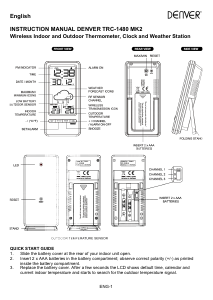
Käyttöohje Denver TRC-1470 Sääasema

Liittyvät tuotteet

Aiheeseen liittyvät luokat

×
Download