English
6
Troubleshooting
Check the below table rst when a malfunction is suspected.
Symptoms and questions Causes and corrections
The power won’t switch on. Ensure that the power cable is correctly connected.
Spots which look like light leaking can be seen on the edges
of the clock screen.
Black LCD panel screens by nature can have this effect, which is not a defect.
The time setting is wrong.
The current time setting can be erased if the power adaptor is disconnected for
a prolonged period of time. Keep the power adaptor connected.
It takes a long time for images to be displayed after the power
has been turned on.
It takes a long time to move from one image to the next.
It is recommended to reduce the picture resolution.
I can’t copy more les even when there is excess capacity to
use in the internal memory.
You may be unable to copy les if the FAT section of the internal memory is
damaged. Try again after formatting the internal memory.
I’ve connected an external memory device (USB memory
device or SD memory card) but it doesn’t work.
• SPF-87H can be used by connecting the power adapter instead of the USB
cable.
• Ensure that the external memory device has been connected properly or try
formatting it.
• Ensure that JPEG les are saved in the external memory device.
• Abnormal picture les (0 Kbyte, broken JPEG) will not be displayed on the
screen.
• The connected external memory device is not supported. Try another storage
device.
Vertical pictures are displayed horizontally.
Ensure that the <Portrait Photo Mode> option is set correctly in <Settings> -
<Photos>.
JPEG les are not displayed.
• Progressively saved JPEG les or JPEG les saved as CMYK color
coordinates will not be displayed.
• Images edited by a JPEG image editor (Photoshop, Paintshop, etc.) may not
be displayed normally. Edit the image on a PC, convert back to JPEG format,
save, and try again.
Some pictures are not displayed as a slideshow.
This product can accommodate a maximum of 4,000 pictures. Any excess
pictures will not be recognized and will not be displayed as a slide show.
The picture size changes when I rotate it.
The picture size changes automatically depending on the rotation angle (90°,
-90°) in order to display the entire image on the screen.
The picture looks stretched horizontally or vertically.
Press [MENU] on the slide show screen. Go to <Settings> - <Photos> -
<Aspect Ratio> and change the setting to <Original Fit> and check again.
Previews are too slow. Previews may be slow for large-sized images and multiple images.
Slide show effects are displayed when I have saved only one
picture I want in the memory card or when I pause the slide
show with multiple pictures saved in the memory card.
The slide show effects will be displayed automatically in order to protect the
panel. This is not an error.
In what order are the pictures, which are saved in the
memory card, displayed?
They are arranged according to the le names. The slide show display order
is determined in the order of number, upper-case letter, and lower-case letter.
Please note that a le name of up to only 25 characters can be recognized.
The slide show doesn’t start automatically. Ensure that the <Startup Mode> is set to <Slideshow> in <Settings> - <General>.
I have set <Auto Picture On/Off> but the screen doesn’t
switch on automatically.
• Ensure that the current time has been set correctly.
• The screen will not switch on automatically if you have turned the digital
frame off by pressing [
] when <Auto Picture On/Off> has been set. The
screen switches on automatically only if the power has been switched off
automatically at the Auto Picture Off time.
The pictures I copied from a USB memory or SD card onto
the internal memory have changed in resolution and le size.
This product is designed to reduce the le size of high-resolution pictures to t
the screen’s ideal resolution when they are copied onto the internal memory.
If you want to disable the settings, you can change to the original size by
selecting <Settings> - <General> - <Frame Memory Copy>.
The digital frame is not recognized as a removable disk when
I connect it to a PC with the USB cable.
The SPF-87H has 2 USB connectors. You must connect the USB connector
[
] because the digital frame will not be recognized as a removable disk if
only the auxiliary power (DC 5V) connector is connected to a PC.
Product Specications
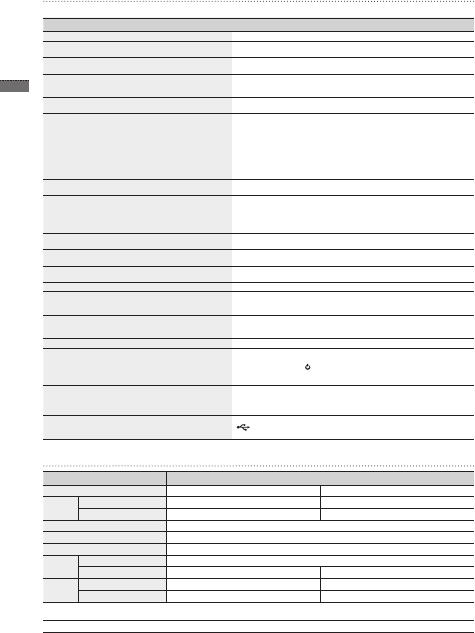
Classication Details
Model name SPF-87H SPF-107H
Panel Type 8” TFT LCD 10” TFT LCD
Resolution 800 x 480 1024 x 600
Supported format JPEG (Progressive or CMYK type pictures are not supported.)
Internal memory 1 GB
USB Host (USB 2.0) / Device (USB 2.0)
Power
supply
Rating External DC power supply device (12 V)
Power consumption General: 5.3 W / Power off: Under 1 W General: 5.9 W / Power off: Under 1 W
General Size (Width x height x depth) 236.0 x 159.4 x 23.0 mm 280.0 x 188.0 x 23.0 mm
Weight 500 g 600 g
The product design may differ according to the model, and specications are subject to change without prior notice for product performance
enhancement.
This device is a Class B digital apparatus.
BN68-01567J.indb 6 2009-07-14 �� 3:47:10


Keskustele tuotteesta
Täällä voit jakaa mielipiteesi Samsung SPF-107H Digitaalinen valokuvakehys:sta. Jos sinulla on kysyttävää, lue ensin huolellisesti käyttöohje. Käsikirjaa voi pyytää yhteydenottolomakkeellamme.
vastaa | Tästä oli apual (0) (Googlen kääntämä)