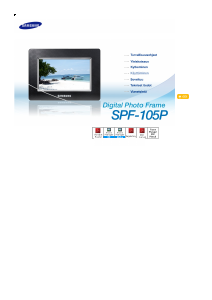
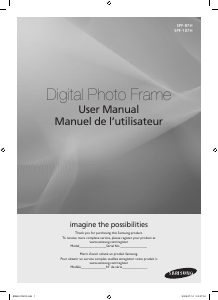
Käyttöohje Samsung SPF-107H Digitaalinen valokuvakehys

Tarvitsetko käyttöoppaan Samsung SPF-107H Digitaalinen valokuvakehys? Alta voit katsoa ja ladata suomenkielisen PDF-oppaan ilmaiseksi. Tällä tuotteella on tällä hetkellä 2 usein kysyttyä kysymystä, 1 kommentti ja 3 ääniä, joiden keskimääräinen tuotearvio on 100/100. Jos tämä ei ole haluamasi käyttöopas, ota meihin yhteyttä.

Onko tuotteessa vika, eikä käyttöoppaasta ole apua? Siirry Repair Café ‑alueelle etsimään ilmaisia korjauspalveluita.

Käyttöohje

Loading…
5
English
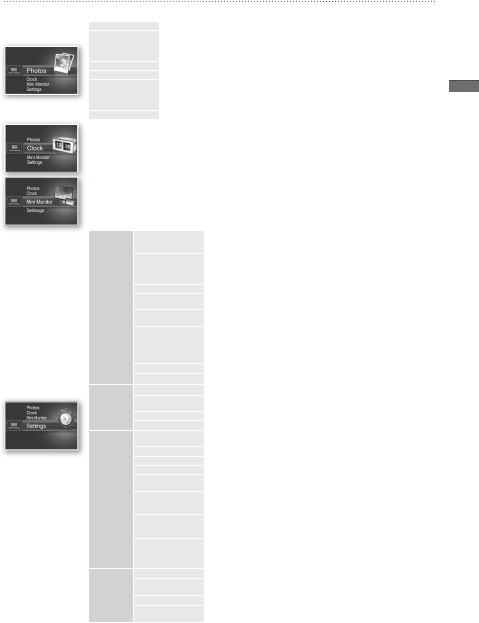
Menu Options
Use the buttons on the back of the product to set various functions to your preferences.
Home Moves to the main screen
Copy If an external memory device (SD memory card/ USB memory device) is connected to the
product,
Copies pictures in an external memory device to the internal memory
Copies pictures in the internal memory to an external memory device
Delete Deletes pictures in the internal memory or an external memory device
Select Multiple Files Selects multiple  les to run functions like slide show, copy, delete, etc.
Select Storage
Device
If an external memory device (SD memory card/USB memory device) is connected to the
product,
Select the internal memory or an external memory device (SD memory card/USB memory
device)
Settings
The current time con gured in <Settings> - <Clock> is displayed. The current time setting can be erased if the
power adaptor is disconnected for a prolonged period of time. Please keep the power adapter connected.
Connect the digital frame to a PC with the USB cable to use as a Mini Monitor.
Photos
Slideshow Transition Sets the slide show effects
No Effect / Fade / Blinds / Cross Comb / Mosaic / Checkerboard / Dissolve
/ Wipe / Extend / Silk / Corner Transition / Wheel / Ellipse / Random
Slideshow Speed Sets the slide show speed
Fast / Normal / Slow
Images of large  le sizes may not be displayed at the currently con gured
slideshow speed.
Slideshow Mode All Photos / Photos in folder / One photo
Slideshow Order Sets the slide show order
Normal / Shuf e
View Mode Sets the slide show display mode
Photo Only / Photo & Clock / Photo & Calendar / Multiview 1 / Multiview 2
Aspect Ratio Original Fit: A picture smaller than the screen is displayed in its original size
and a picture bigger than the screen size is reduced in direct
proportion to the screen size.
Auto Fit: Fits the picture in direct proportion to the screen size
Fit to Width: Fits the picture to the screen’s horizontal width
Portrait Photo Mode Reduces a vertical picture to  t the screen
Display Photo Info Displays a picture’s  le name and date of creation
Clock
Clock Set Sets the current time
Date Format Select the month, year, day display mode
(YYYY/MM/DD, MM/DD/YYYY, DD/MM/YYYY)
Time Format Selects the time display mode (12 hours, 24 hours)
Clock Type Selects the clock display mode (Clock Only, Clock & Calendar)
General
Quick Setup Easy settings for frequently used functions
(View Mode, Slideshow Transition, Clock Set, and Startup Mode)
Language Selects the OSD (on-screen display) language
Brightness Adjusts the screen brightness
Auto Picture On/Off Sets the screen to automatically turn on and off at certain times
Startup Mode Selects the screen to be displayed when the digital frame is switched on
Home / Last Mode / Slideshow
Screen Saver If there is no button operation for 10 minutes, the currently con gured
screensaver will appear.
Slideshow / Clock
Frame Memory Copy Original Size: Copies an original  le as is
Resized: Matches the screen’s optimal resolution by reducing the  le size
and then copies.
Activate USB
Communication
Selects the recognition mode to be used when the digital frame is connected
to a PC with a USB cable
Use as a removable disk or Mini Monitor
Use as a digital photo frame
Support
Upgrade Software Updates the  rmware
Reset Resets user-customized menu options to default
(Time setting and screen language setting excluded)
Product Guide Product functions guide
Product Information Displays product model name,  rmware version, internal memory and
copyrights
BN68-01567J.indb 5 2009-07-14 �� 3:47:09
Lataa käyttöohje suomalainen (PDF, 11.23 MB)
(Mieti ympäristöä ja tulosta tämä käyttöopas vain, jos se on todella tarpeen)

Loading…

Arviointi

Kerro meille mielipiteesi Samsung SPF-107H Digitaalinen valokuvakehys arvioimalla tuote. Haluatko jakaa tuotekokemuksesi tai kysyä kysymyksen? Jätä kommentti sivun alalaidassa.
Oletko tyytyväinen kohteeseen Samsung SPF-107H Digitaalinen valokuvakehys?
Kyllä Ei
100%
0%
3 äänet

Keskustele tuotteesta

Täällä voit jakaa mielipiteesi Samsung SPF-107H Digitaalinen valokuvakehys:sta. Jos sinulla on kysyttävää, lue ensin huolellisesti käyttöohje. Käsikirjaa voi pyytää yhteydenottolomakkeellamme.

A U 14-11-2022
Mitä SD-kortin kapasiteettia tuetaan?

vastaa | Tästä oli apual (0) (Googlen kääntämä)

Lisää tästä ohjekirjasta

Ymmärrämme, että on mukavaa, että sinulla on paperikäyttöinen käyttöopas laitteellesi Samsung SPF-107H Digitaalinen valokuvakehys. Voit aina ladata oppaan verkkosivuiltamme ja tulostaa sen itse. Jos haluat alkuperäisen käyttöoppaan, suosittelemme ottamaan yhteyttä osoitteeseen Samsung. He saattavat pystyä toimittamaan alkuperäisen ohjekirjan. Etsitkö laitteen Samsung SPF-107H Digitaalinen valokuvakehys käyttöopasta toisella kielellä? Valitse haluamasi kieli kotisivuiltamme ja etsi mallinumero nähdäksesi, onko sitä saatavilla.

Tekniset tiedot

Tuotemerkki Samsung
Malli SPF-107H
Kategoria Digitaaliset valokuvakehykset
Tiedostotyyppi PDF
Tiedoston koko 11.23 MB

Kaikki käsikirjat kohteelle Samsung Digitaaliset valokuvakehykset
Lisää Digitaaliset valokuvakehykset käsikirjoja

Usein kysytyt kysymykset kohteesta Samsung SPF-107H Digitaalinen valokuvakehys

Tukitiimimme etsii hyödyllisiä tuotetietoja ja vastaa yleisiin kysymyksiin. Jos huomaat yleisissä kysymyksissä virheen, kerro siitä meille yhteydenottolomakkeella.

Mitä megapikseli tarkoittaa? Todennettu

Megapikseli (Mpx) tarkoittaa miljoonaa pikseliä eli kuvapistettä. Megapikseleitä käytetään muun muassa digitaalikameroiden ja kameranauhurien resoluution ilmaisemiseen. Jos esimerkiksi kamerassa on 1280x960 pikselin kuvat, kameran resoluutio on noin 1,3 Mpx. Kuvan laatu riippuu monista tekijöistä, mutta yleisesti ottaen suurempi megapikselimäärä antaa paremman kuvan.

Tästä oli apual (97) Lue lisää

Mitä SD tarkoittaa? Todennettu

SD tarkoittaa Secure Digital. SD-kortit ovat tavallinen tallennusväline monille digitaalikameroille.

Tästä oli apual (29) Lue lisää
Käyttöohje Samsung SPF-107H Digitaalinen valokuvakehys

Liittyvät tuotteet

Aiheeseen liittyvät luokat

×
Download