Käyttöohje Exibel GMX-W Hiiri

Tarvitsetko käyttöoppaan Exibel GMX-W Hiiri? Alta voit katsoa ja ladata suomenkielisen PDF-oppaan ilmaiseksi. Tällä tuotteella on tällä hetkellä 4 usein kysyttyä kysymystä, 0 kommenttia ja 3 ääniä, joiden keskimääräinen tuotearvio on 33/100. Jos tämä ei ole haluamasi käyttöopas, ota meihin yhteyttä.

Onko tuotteessa vika, eikä käyttöoppaasta ole apua? Siirry Repair Café ‑alueelle etsimään ilmaisia korjauspalveluita.

Käyttöohje

Loading…
GREAT BRITAIN - CUSTOMER SERVICE contact number: 020 8247 9300 e-mail: customerservice@clasohlson.co.uk internet: www.clasohlson.co.uk
English
Ver. 20150410
Wireless Gaming Mouse
Art.no 38-6916 Model GMX-W
Please read theentire instruction manual before using theproduct and then save it for future
reference. We reserve theright for any errors in text or images and any necessary changes
made to technical data. In theevent of technical problems or other queries, please contact
our Customer Services.
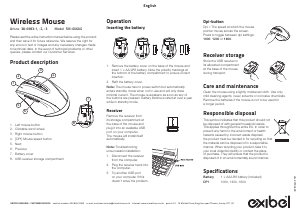
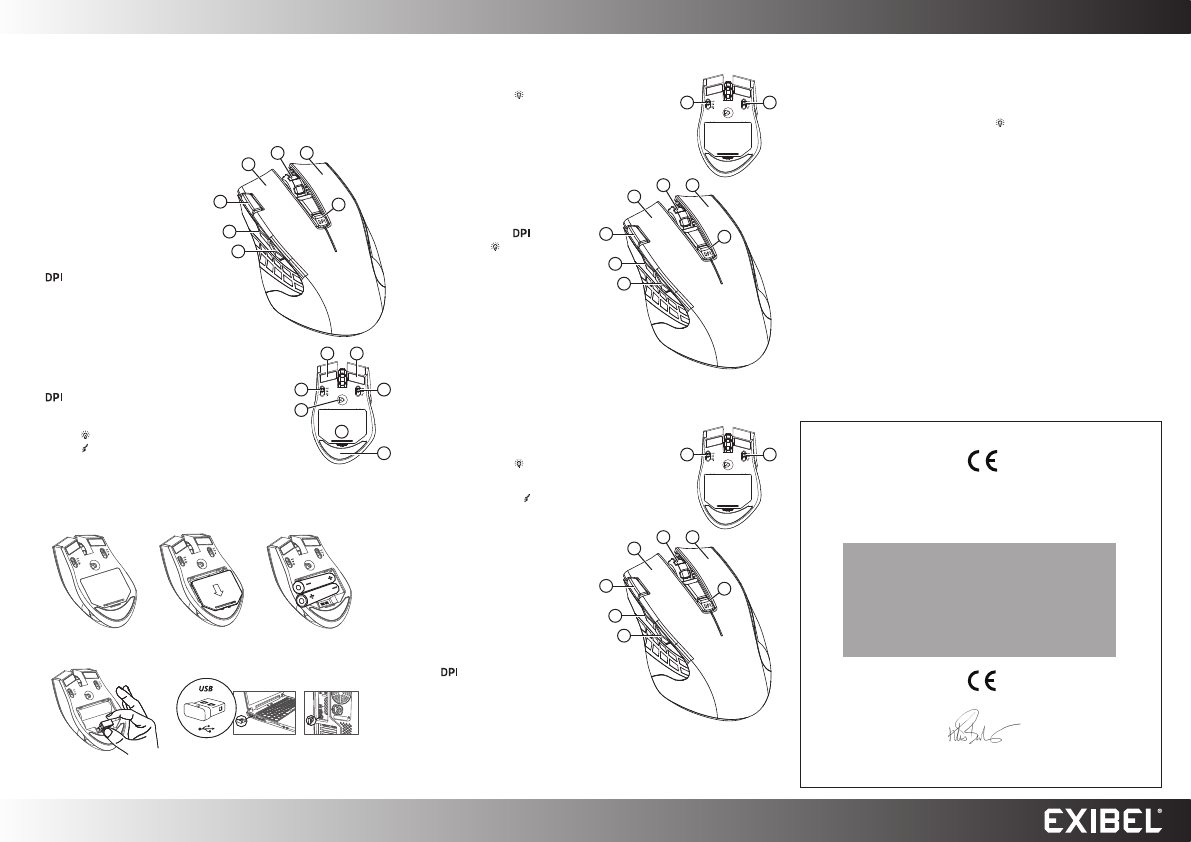
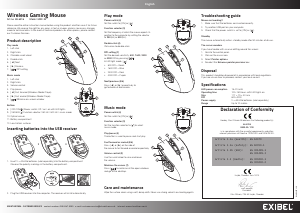
Product description
Play mode
1. Left click
2. Right click
3. Clickable scroll wheel
4. Double-click
5. [ ] Next
6. [ ] Previous
7. [
] DPI setting
Music mode
1. Left click
2. Right click
3. Volume control
4. Play/pause
5. [ ] Fast forward (Windows Media Player)
6. [ ] Fast rewind (Windows Media Player)
7. [
] Minimise on-screen window
Bottom
8. [ OFF/ON/
] Power switch: Off / on / on with LED lights
9. [ 250/500/
] Function selector: 250 Hz / 500 Hz / music mode
10. Optical sensor
11. Battery compartment
12. Low-friction surfaces
23
1
4
7
5
6
11
8 9
10
12
12 12
Inserting batteries into the USB receiver
4
5
1. Insert 2×AA/LR6 batteries (sold separately) into thebattery compartment.
Observe the polarity markings in the battery compartment.
2. Plug theUSB receiver into thecomputer. Thereceiver will install automatically.
Play mode
Power switch (8)
Set the switch to [ ON ] or [
].
Function selector (9)
Set the frequency at which the mouse reports its
position to the computer by setting the selector
to 250 (Hz) or 500 (Hz).
Double-click (4)
Click once to double-click.
DPI setting (7)
Set thedesired sensitivity: 800, 1600, 2400
or 4000 DPI by pressing [
].
In LED light mode [
]
800 DPI = Green
1600 DPI = Blue
2400 DPI = Red
4000 DPI = Purple
Next/previous (5/6)
Press [ ] or [ ] respectively to
go forwards or backwards.
Troubleshooting guide
Mouse not working?
1. Make sure that thebatteries are inserted correctly.
2. Try another USB port on your computer.
3. Check that thepower switch is set to [ ON ] or [
].
Standby
Themouse automatically enters standby mode after 30 minutes of disuse.
Thecursor wanders
If you have trouble with acursor drifting around thescreen:
1. Go into thecontrol panel.
2. Click on themusic icon.
3. Select Pointer options.
4. Deselect the Enhance pointer precision box.
Disposal
This product should be disposed of in accordance with local regulations.
If you are unsure how to proceed, contact your local council.
Specifications
LED power consumption 15–22mAh
Operating time 100–150 hours with LED lights on
Size 117×73×40 mm
DPI 800–4000
Power supply 2×AA/LR6 batteries (sold separately)
Range Up to 10 metres
Music mode
Power switch (8)
Set the switch to [ ON ] or [
].
Function selector (9)
Set the function selector to [
] to select
music mode.
Play/pause (4)
The button is used to pause and start play.
Fast forward or rewind (5/6)
Press [ ] or [ ] on the side of
the mouse to fast forward or rewind respectively.
Volume control (3)
Use thescroll wheel to raise and lower
thevolume.
Minimise thescreen (7)
Press [
] to minimise all theopen windows
and go to thedesktop.
Declaration of Conformity
Hereby, Clas Ohlson AB declares that following product(s):
38-6916
GMX-W / C20
is in compliance with the essential requirements and other
relevant provisions of Directive 1999/5/EC and 2006/95/EC.
Article 3.1a (Health): EN 62479
Article 3.1a (Safety): EN 60950-1
Article 3.1b (EMC): EN 301489-1
EN 301489-3
Article 3.2 (Radio): EN 300440-1
EN 300440-2
Insjön, Sweden, Jan. 2015
Klas Balkow,
President.
Clas Ohlson, 793 85 Insjön, Sweden
23
1
4
7
5
6
23
1
4
7
5
6
8 9
8 9
Care and maintenance
Wipe thesurface clean using asoft, damp cloth. Never use strong solvents or cleaning agents.
1 2 3
Lataa käyttöohje suomalainen (PDF, 3.01 MB)
(Mieti ympäristöä ja tulosta tämä käyttöopas vain, jos se on todella tarpeen)

Loading…

Arviointi

Kerro meille mielipiteesi Exibel GMX-W Hiiri arvioimalla tuote. Haluatko jakaa tuotekokemuksesi tai kysyä kysymyksen? Jätä kommentti sivun alalaidassa.
Oletko tyytyväinen kohteeseen Exibel GMX-W Hiiri?
Kyllä Ei
33%
67%
3 äänet

Keskustele tuotteesta

Täällä voit jakaa mielipiteesi Exibel GMX-W Hiiri:sta. Jos sinulla on kysyttävää, lue ensin huolellisesti käyttöohje. Käsikirjaa voi pyytää yhteydenottolomakkeellamme.

Lisää tästä ohjekirjasta

Ymmärrämme, että on mukavaa, että sinulla on paperikäyttöinen käyttöopas laitteellesi Exibel GMX-W Hiiri. Voit aina ladata oppaan verkkosivuiltamme ja tulostaa sen itse. Jos haluat alkuperäisen käyttöoppaan, suosittelemme ottamaan yhteyttä osoitteeseen Exibel. He saattavat pystyä toimittamaan alkuperäisen ohjekirjan. Etsitkö laitteen Exibel GMX-W Hiiri käyttöopasta toisella kielellä? Valitse haluamasi kieli kotisivuiltamme ja etsi mallinumero nähdäksesi, onko sitä saatavilla.

Tekniset tiedot

Tuotemerkki Exibel
Malli GMX-W
Kategoria Hiiret
Tiedostotyyppi PDF
Tiedoston koko 3.01 MB

Kaikki käsikirjat kohteelle Exibel Hiiret
Lisää Hiiret käsikirjoja

Usein kysytyt kysymykset kohteesta Exibel GMX-W Hiiri

Tukitiimimme etsii hyödyllisiä tuotetietoja ja vastaa yleisiin kysymyksiin. Jos huomaat yleisissä kysymyksissä virheen, kerro siitä meille yhteydenottolomakkeella.

Mikä on paras pinta käyttää hiirtä? Todennettu

Perinteinen ohjauspallohiiri toimii parhaiten pehmustetulla pinnalla, kuten hiirimatto. Optinen hiiri toimii melkein kaikilla tasaisilla pinnoilla lukuun ottamatta läpinäkyviä tai heijastavia pintoja. Pinnat, joissa on toistuva kuvio, saattavat häiritä hiiren toimintaa.

Tästä oli apual (127) Lue lisää

Mikä on ergonominen hiiri? Todennettu

Tavallisen hiiren päivittäinen käyttö pitkään aikaan voi aiheuttaa kipua käsivarteen ja ranteen. Tätä kutsutaan myös RSI: ksi (Repetitive Strain Injury). Ergonominen hiiri on muotoiltu vähentämään näitä ongelmia tai estämään niitä.

Tästä oli apual (59) Lue lisää

Mitä eroa on normaalilla hiirellä ja pelihiirellä? Todennettu

Kaikkia pelihiiriä voidaan käyttää tavallisena hiirenä. Pelihiiressä on kuitenkin usein lisäpainikkeita tietyissä paikoissa pelaamisen helpottamiseksi. On jopa pelihiiriä, joissa on painikkeita, joiden on tarkoitus pelata paremmin tiettyä peliä.

Tästä oli apual (58) Lue lisää

Minkä kokoinen hiiri on kätelleni paras? Todennettu

Tämä riippuu osittain henkilökohtaisista mieltymyksistä ja välttämättömyydestä, mutta yleensä hiiren tulisi olla noin 60% käden koosta. Tämä on mukavin ja ergononinen.

Tästä oli apual (53) Lue lisää
Käyttöohje Exibel GMX-W Hiiri

Liittyvät tuotteet

Aiheeseen liittyvät luokat

×
Download