Käyttöohje Clas Ohlson YP-04238/01 Rannekello

Tarvitsetko käyttöoppaan Clas Ohlson YP-04238/01 Rannekello? Alta voit katsoa ja ladata suomenkielisen PDF-oppaan ilmaiseksi. Tällä tuotteella on tällä hetkellä 6 usein kysyttyä kysymystä, 0 kommenttia ja 0 ääntä. Jos tämä ei ole haluamasi käyttöopas, ota meihin yhteyttä.

Onko tuotteessa vika, eikä käyttöoppaasta ole apua? Siirry Repair Café ‑alueelle etsimään ilmaisia korjauspalveluita.

Käyttöohje

Loading…
English
GREAT BRITAIN
customer service tel 020 8247 9300 e-mail [email protected]
internet www.clasohlson.co.uk postal 10 – 13 Market Place, Kingston Upon Thames, Surrey, KT1 1JZ
Ver. 20180420
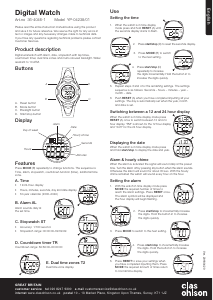
Activating thealarm and hourly chime
With thewatch in time display mode, press MODE therequired
number of times to reach thealarm settings. Press start/stop
once. Thealarm symbol will be displayed.
Press start/stop therequired amount of times to either activate
thehourly chime or alarm and thehourly chime combined.
Combining the alarm and hourly chime
Alarm only (alarm symbol displayed).
Hourly chime only (chime symbol displayed)
Both alarm and hourly chime (both symbols displayed)
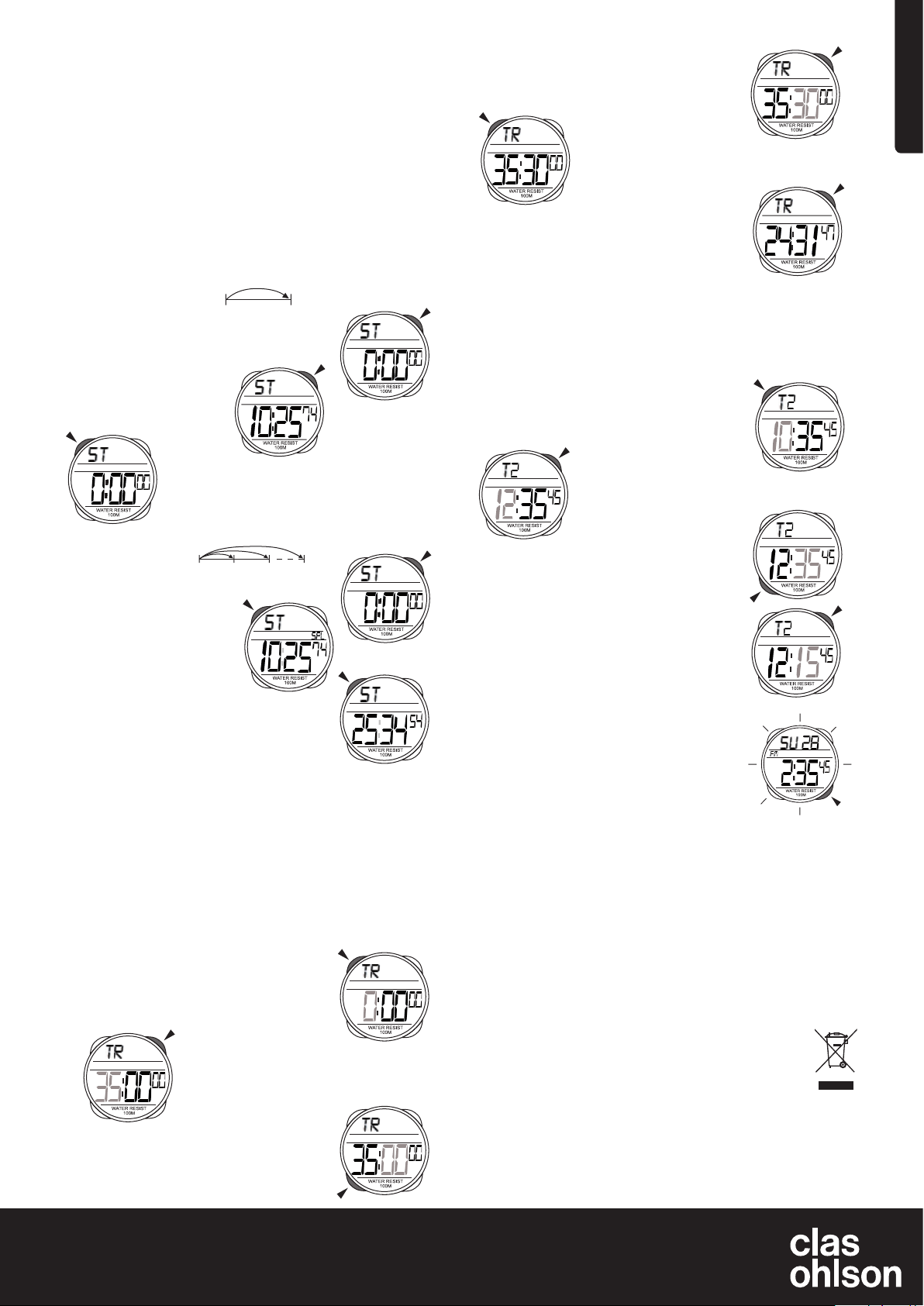
Stopwatch
Without split-time
1. Press MODE therequired number of times to
reach thestopwatch mode.
3. Stop thestopwatch by pressing start/stop again.
4. Press RESET to reset thestopwatch back to zero.
With split-time
1. Press MODE therequired number of times to
reach thestopwatch mode.
3. Press RESET to display split-time. “SPL” is
displayed. Thestopwatch will not be visible
but will continue running in thebackground.
4. Press RESET to view therunning stopwatch
display.
5. Steps 3 and 4 can be repeated as many times as you like.
6. Press start/stop to stop thestopwatch.
7. Press RESET to reset thestopwatch back to zero.
Countdown timer
When thewatch has counted down to zero analarm will sound.
Turn it off by pressing any button. Otherwise thealarm will
continue to sound for about 60 seconds.
Thetimer can be set for up to 60 minutes.
Setting thecountdown timer
1. Press MODE therequired number of times
to reach countdown timer mode. “TR” will
be displayed.
3. Press start/stop to incrementally increase
thedigits. Hold thebutton in to increase
thedigits quickly.
2. Press start/stop to start
thestopwatch.
2. Press start/stop to start
thestopwatch.
2. Press RESET for theminutes display.
Once it starts flashing you can enter your
desired settings.
Backlight
Thebacklight provides illumination which
makes thedigits easier to read in darkness.
Thebacklight can be turned on by pushing
thebacklight button. Thebacklight will be lit
for about 4 seconds.
Care and maintenance
Never try to open thecasing.
Do not press thebuttons when thewatch is under water.
If there is any moisture inside thewatch contact our customer service
department immediately. Moisture inside thewatch could cause damage to
themetal parts.
Thewatch can withstand some rough treatment, but do not expose it to
unnecessary blows.
Do not expose thewatch to extreme temperatures.
Clean thewatch using adry, soft cloth. Avoid strong detergents since they
can damage theplastic parts of thewatch.
Avoid wearing thewatch in thevicinity of strong electromagnetic fields.
Responsible disposal
This symbol indicates that this product should not be disposed of
with general household waste. This applies throughout the entire EU.
In order to prevent any harm to the environment or health hazards
caused by incorrect waste disposal, the product must be handed in
for recycling so that the material can be disposed of in a responsible
manner. When recycling your product, take it to your local collection
facility or contact the place of purchase. They will ensure that the product is
disposed of in an environmentally sound manner.
Specifications
Diameter 46 mm
Battery size CR2025 (included)
4. Press MODE to reach to thenext setting.
5. Press start/stop to incrementally increase
thedigits. Hold thebutton in to increase
thedigits quickly.
6. Push RESET once you have completed
inputting your settings.
Using thecountdown timer
1. Set thecountdown timer according to theinstructions above.
2. Press start/stop to start thecountdown timer.
3. Press start/stop again if you wish to pause thecountdown.
Dual time zones
Setting time zone 2
1. Press MODE therequired number of times
to reach thetime zone 2 setting. “T2” will
be displayed.
2. Press RESET for thehours display.
Once it starts flashing you may input
thedesired setting.
3. Press start/stop to incrementally increase
thedigits. Hold thebutton in to increase
thedigits quickly.
4. Press MODE to set theminutes.
5. Press start/stop to change theminutes.
Pressing once changes thesetting in
30 minute increments.
6. Push RESET once you have completed
inputting your settings.
Water resistant 10 ATM
Lataa käyttöohje suomalainen (PDF, 0.82 MB)
(Mieti ympäristöä ja tulosta tämä käyttöopas vain, jos se on todella tarpeen)

Loading…

Arviointi

Kerro meille mielipiteesi Clas Ohlson YP-04238/01 Rannekello arvioimalla tuote. Haluatko jakaa tuotekokemuksesi tai kysyä kysymyksen? Jätä kommentti sivun alalaidassa.
Oletko tyytyväinen kohteeseen Clas Ohlson YP-04238/01 Rannekello?
Kyllä Ei
Arvostele tuote ensimmäisenä
0 äänet

Keskustele tuotteesta

Täällä voit jakaa mielipiteesi Clas Ohlson YP-04238/01 Rannekello:sta. Jos sinulla on kysyttävää, lue ensin huolellisesti käyttöohje. Käsikirjaa voi pyytää yhteydenottolomakkeellamme.

Lisää tästä ohjekirjasta

Ymmärrämme, että on mukavaa, että sinulla on paperikäyttöinen käyttöopas laitteellesi Clas Ohlson YP-04238/01 Rannekello. Voit aina ladata oppaan verkkosivuiltamme ja tulostaa sen itse. Jos haluat alkuperäisen käyttöoppaan, suosittelemme ottamaan yhteyttä osoitteeseen Clas Ohlson. He saattavat pystyä toimittamaan alkuperäisen ohjekirjan. Etsitkö laitteen Clas Ohlson YP-04238/01 Rannekello käyttöopasta toisella kielellä? Valitse haluamasi kieli kotisivuiltamme ja etsi mallinumero nähdäksesi, onko sitä saatavilla.

Tekniset tiedot

Tuotemerkki Clas Ohlson
Malli YP-04238/01
Kategoria Rannekellot
Tiedostotyyppi PDF
Tiedoston koko 0.82 MB

Kaikki käsikirjat kohteelle Clas Ohlson Rannekellot
Lisää Rannekellot käsikirjoja

Usein kysytyt kysymykset kohteesta Clas Ohlson YP-04238/01 Rannekello

Tukitiimimme etsii hyödyllisiä tuotetietoja ja vastaa yleisiin kysymyksiin. Jos huomaat yleisissä kysymyksissä virheen, kerro siitä meille yhteydenottolomakkeella.

Laitteeni akku on hapetettu, voinko silti käyttää sitä turvallisesti? Todennettu

Ja, laitetta voidaan silti käyttää turvallisesti. Poista ensin oxidizd-paristo. Älä koskaan käytä tätä paljain käsin. Puhdista sitten paristolokero etikkaan tai sitruunamehuun kastetulla vanupuikolla. Anna sen kuivua ja aseta uudet paristot.

Tästä oli apual (945) Lue lisää

Mekaaninen kelloni toimii nopeasti, mitä voin tehdä? Todennettu

Tämä voi johtua altistumisesta magneettikentälle. Se voidaan ratkaista ammattimaisen kellosepän suorittamalla demagnetointiprosessilla.

Tästä oli apual (884) Lue lisää

Mitä AM ja PM edustavat? Todennettu

AM tarkoittaa Ante Meridiemiä ja osoittaa, että aika on ennen keskipäivää. PM tarkoittaa Post Meridiemia ja osoittaa, että aika on keskipäivän jälkeen.

Tästä oli apual (758) Lue lisää

Mikä on 'Chronograph'? Todennettu

"Chronograph" on kirjaimellisesti "ajan kirjoittaja". Termiä käytetään kuvaamaan kelloja, jotka kertovat kellonajan ja mittaavat tietyn ajanjakson, kuten sekuntikellon.

Tästä oli apual (662) Lue lisää

Mikä on GMT? Todennettu

GMT tarkoittaa Greenwichin aikaa (joskus kutsutaan UTC, joka tarkoittaa koordinoitua universaaliaikaa). On aika 0-pituusasteelle, joka kulkee Greenwichin läpi Lontoon lähellä.

Tästä oli apual (503) Lue lisää

Mikä on kvartsiliike? Todennettu

Kvartsiliikkeellä varustettuja kelloja ohjaa akku. Tämä lähettää sähkövirran värähtelevän kvartsikiteiden läpi. Nämä värähtelyt siirtyvät liikkeeseen. Koska värähtelyillä on kiinteä taajuus, kvartsiliikkeellä varustetut kellot ovat erittäin tarkkoja.

Tästä oli apual (483) Lue lisää
Käyttöohje Clas Ohlson YP-04238/01 Rannekello

Liittyvät tuotteet

Aiheeseen liittyvät luokat

×
Download