WWW.QCONNECT.COM
3
I AUto / on :
This setting allows the shredder to be automatically started
by inserting paper into the shred opening. Always feed the
paper in as straight as possible. When the paper has passed
through, the shredder will automatically stop.
o off :
This setting turns off all features of the shredder. For safety
reasons, we recommend that you leave the shredder in the
“Off” position whenever the shredder is unattended or not
in use.
R REV (REVERSE):
In the unlikely event of a paper jam, the reverse setting can
be used to help clear the cutters of paper that has not passed
through. Never attempt to clear a jam by using the reverse
function until you have emptied the wastebasket.
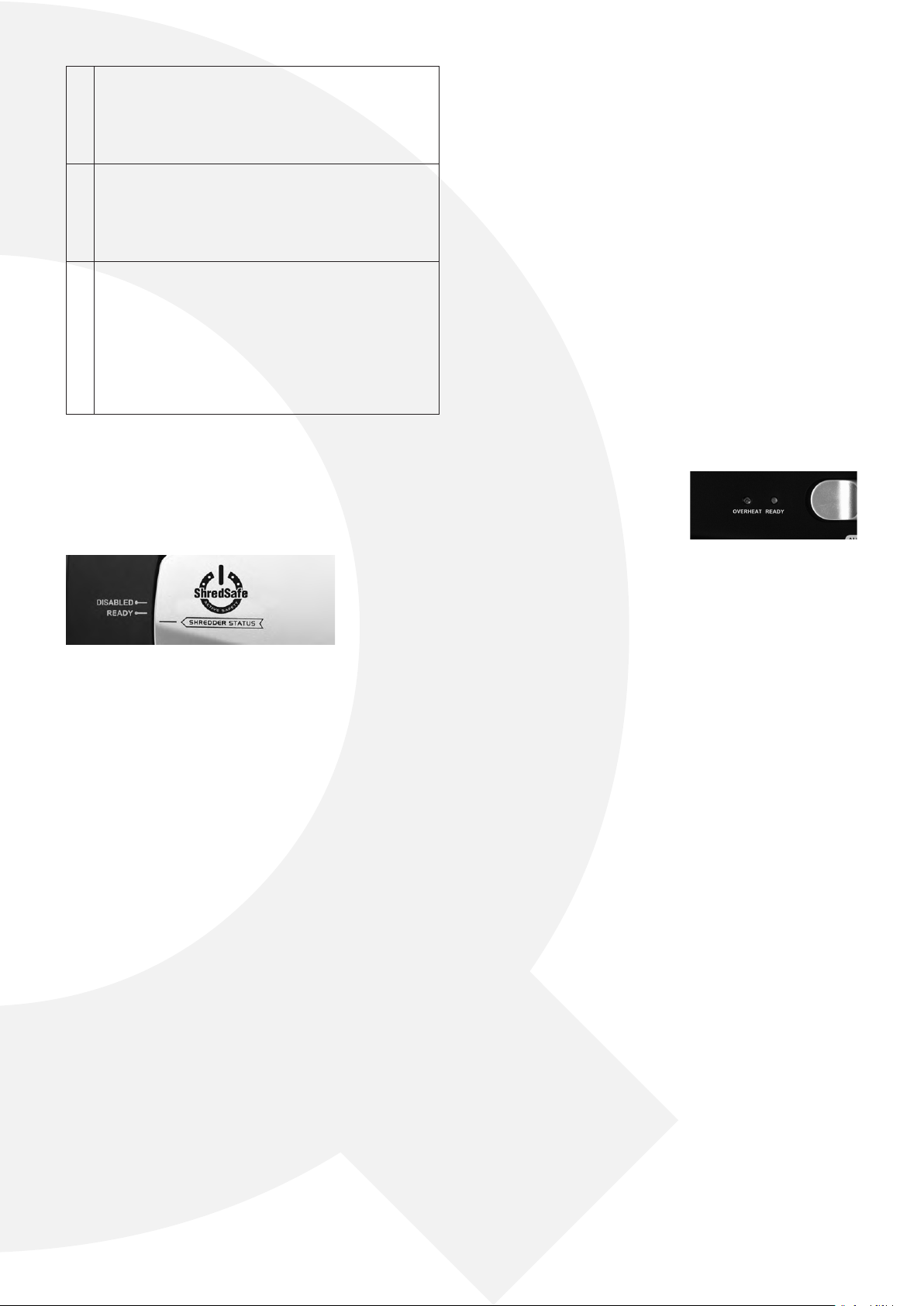
READY : tHE GREEn lED lIGHt InDICAtES tHE
SHREDDER In “on” AnD READY foR USE.
To begin shredding, locate the switch on the unit and select the
“Auto” mode . The Green LED light indicates the shredder is “On” and
ready to use. Press the designated “PUSH OPEN” area on the handle
of the cover to tilt open and expose the paper feed slot .T h e cove r
will click into a preset position where the “SHREDDER ST ATUS” indi-
cation line must align with the “READY” setting.
READY: The shredder is currently on STANDBY and ready to operate
when paper is inserted. With the feed slot now exposed, you can
shred sheets of paper or 1 credit card per pass .
DISABLED: The safety feature has been activated. All power to the
SHREDDER IS CURRENTL Y SHUT OFF AND WILL NOT OPERATE un-
til the cover is returned to the “READY” setting. The cover has been
completely tilted beyond the safe position .
When shredding is completed, you can press the designated “PUSH
CLOSE” area on the cover to tilt shut the paper feed slot . It is recom-
mended to have the paper feed slot closed when shredder is not in
use to prevent any objects from accidentally getting into the feed
slot.
*Be sure to not tilt open the cover completely beyond the preset
position, otherwise the ShredSafe™ power cut off feature will be ac-
tivated and the shredder will be inoperable. Shredding of any of the
following materials is considered misuse and will completely void
the product warranty:
Never shred large paper clips, envelopes (any window, insulated, or
with glued flaps), adhesive materials (labels, decals/stickers, glued
paper), newsprint, transparencies, laminated documents, continu-
ous forms, cardboard, or hard and plastic materials (except Credit
Cards).
This shredder will shred staples and small paperclips. It is recom-
mended that you remove paper clips whenever possible to extend
the lifespan of your shredder. Only shred credit cards by feeding
them vertically into the middle of the entry, releasing when shred-
ding begins. Never feed more than one credit card at a time.
Do not ACtIVAtE REVERSE fUnCtIon WHIlE SHREDDInG
CREDIt CARDS.
Overfeeding the shredder: Shredding beyond the specified sheet
capacity can result in extensive damage to the shredder. Overfeed-
ing will strain the machine and quickly wear and break the cutting
blades and internal components.
Overheating with extended use: In the event that the shredder has
shred continuously beyond the maximum running time and over-
heating, the unit will automatically shut off. If this happens, switch
the shredder Off for 30 minutes or longer before resuming normal
operation.
lED StAtUS InDICAtoRS
READY (PoWER on)
The green led light indicates the
shredder is “on” and ready to oper-
ate when paper is inserted.
oVERHEAt
The red light indicates the shredder has shred continuously beyond
the maximum running time and overheating, the unit will automati-
cally shut off. If it happens, switch the shredder off for 30 minutes or
longer before resuming operation.
MAIntEnAnCE
Warning: Failure to properly maintain your shredder will void
the warranty.
Crosscut shredders require regular oil lubrication for optimal perfor-
mance and extended lifespan. We recommend you oil your shred-
der once a month. Your basic vegetable or cooking oil (nothing
flammable or petroleum based) can be drizzled onto a few sheets
of paper and fed into the shredder.
ONLY USE NON-AEROLSOL VEGETABLE BASED OILS TO OIL
YOUR CUTTERS. DO NOT SPRAY OR KEEP ANY AEROSOL PROD-
UCTS IN OR AROUND THE SHREDDER. DO NOT USE CANNED
AIR.
Be sure to periodically empty the wastebasket to avoid over-
loading and damaging the cutting mechanism.
ClEAnInG:
ALWAYS UNPLUG THE SHREDDER BEFORE CLEANING!•
Only clean the shredder by carefully wiping the unit with a dry •
soft cloth or towel.
Do not clean or immerse shredder in water. Having the unit wet •
may result in damage or malfunction to the electrical compo-
nents. If the shredder happens to get wet, be sure to completely
dry the unit immediately with a cloth or towel.
Never use anything flammable to clean the shredder. This may •
result in serious injury or damage to the product.
t


Keskustele tuotteesta
Täällä voit jakaa mielipiteesi Q-CONNECT Q10CC22 Paperisilppuri:sta. Jos sinulla on kysyttävää, lue ensin huolellisesti käyttöohje. Käsikirjaa voi pyytää yhteydenottolomakkeellamme.