Käyttöohje Hoover HPI430 Keittotaso

Tarvitsetko käyttöoppaan Hoover HPI430 Keittotaso? Alta voit katsoa ja ladata suomenkielisen PDF-oppaan ilmaiseksi. Tällä tuotteella on tällä hetkellä 3 usein kysyttyä kysymystä, 0 kommenttia ja 0 ääntä. Jos tämä ei ole haluamasi käyttöopas, ota meihin yhteyttä.

Onko tuotteessa vika, eikä käyttöoppaasta ole apua? Siirry Repair Café ‑alueelle etsimään ilmaisia korjauspalveluita.

Käyttöohje

Loading…
E`efdgUf[a`e Xad NeW
U^[d j^[ fem[h _i im_jY^[Z ed1 j^[ Xkpp[h m_bb
Operating instructions
--
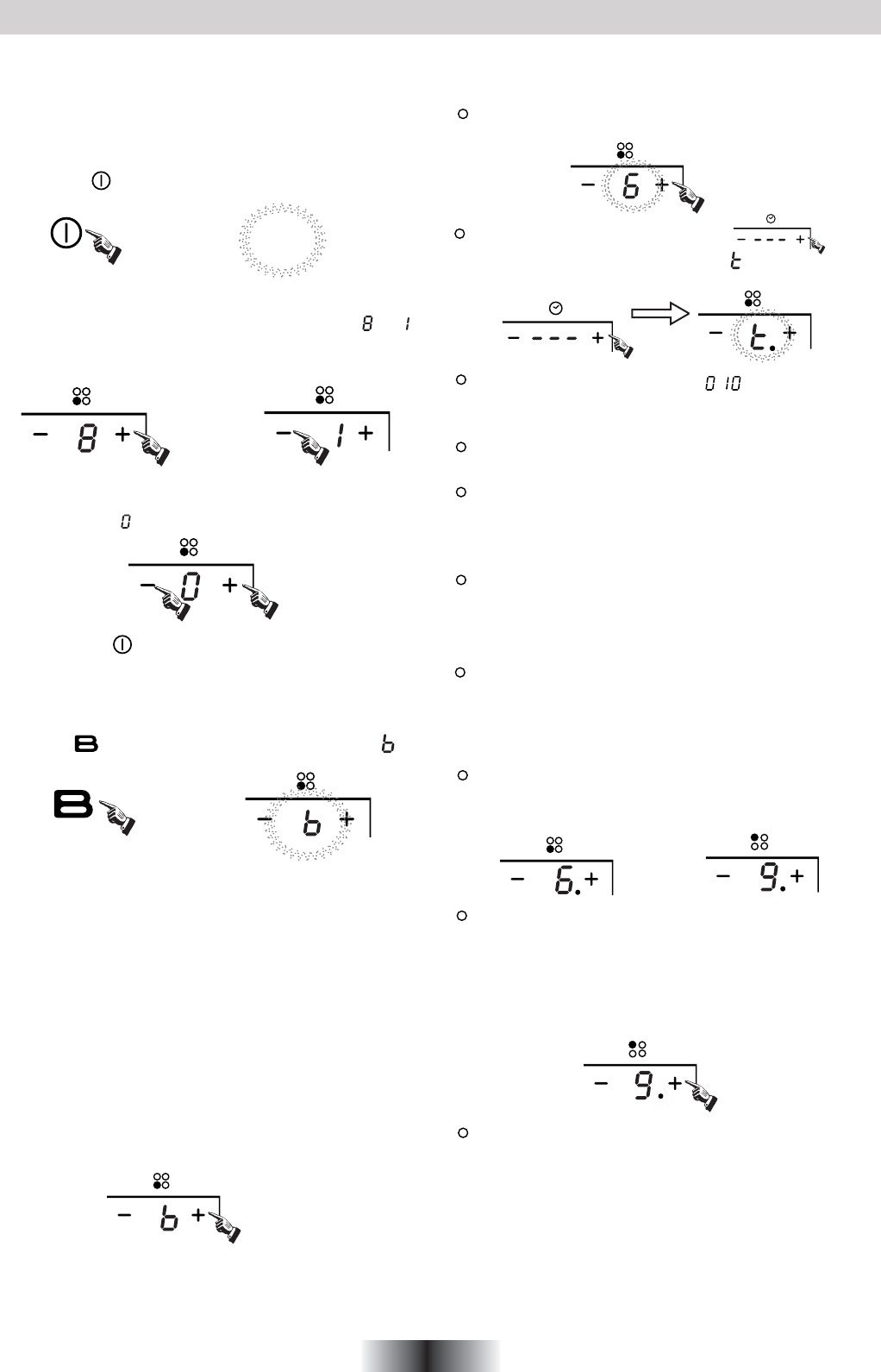
Boost function
Warning:
2. The boost function works on the all cooking zone.
Cancelling the "BOOST" mode
1.Press the " " key, all the indicators show "--".
Press the“ " key, the power level indicator showing " "
4 GB
iekdZ edY[
WdZ Wbb j^[ _dZ_YWjehi m_bb Yec[ ed
\eh ed[ i[YedZ WdZ j^[d
]e ekj3 R^[ ^eX _i dem
_d ijWdZXo ceZ[3
ObWY[ j^[ fWd _d
j^[
Y[djh[ e\ j^[ Yeea_d] ped[3
Select the power level by pressing the "+" or "-" key for the
relevant hotplate. To begin with the indicator shows" "or " "
by pressing the "+" or "-" key. Adjust up or down by pressing
the "+" or "-" key.
If you press the "+" and "-" keys simultaneously, the power
setting returns to" "and the cooking zone switches off.
NB : When the " " key is pressed, the induction hob returns
to standby mode if no other operation is carried out
within two minutes.
1. The boost function only operates for 5 minutes, after which
the cooking zone will revert to its original setting.
3. As the boost function of the 1st cooking zone is activated,
the 2nd cooking zone is limited under level 2 automatically,
vice versa. As the boost function of the 3rd cooking zone is
activated,the 4th cooking zone is limited under level 2
automatically, vice versa.
Cancel the "Boost" mode by pressing the "+" or "-" key of the
corresponding zone.
If more than 1 zone is switch on :
Press the "+" key once increases the time by one minute ;
hold down the "+" key increases the time by 10 minutes ;
Press the "-" key once decreases the time by one minute ;
hold down the "-" key decreases the time by 10 minutes ;
If the timer is set on more than 1 zone:
Timer function
Note:
1. When the timer is 0 minute, the timer is cancelled.
You can set the power level during the timer mode.
:
then press the " + " or " - " timer key power
activate the selected zone by pushing "+" or "-" key of that
zone,the corresponding digits will be flashing.
level indicator flashing and showing " " and the timer
indicator flashes
To begin with the indicator shows" ",set the time by
pressing the "+" or "-" key. After setting the time, you can
select the power level of the cooking zone.
Then set the time for between 1 minute and 9 hours 59
minutes by pressing the "+" or "-" key.
When the time exceeds 1 hour, hold down the "+" key
increases the time by 30 minutes .
When the time exceeds 2 hours, hold down the "-" key
decreases the time by 30 minutes .
Timer can be set on all 4 cooking zones. When you set the
time for several cooking zones simultaneously, decimal
dots of the relevant cooking zones are on.
on the timer display will be shown the timer than will expire
first. The dot of the corresponding zone will be on but
flashing.Once the countdown timer expires the
corresponding zone will be switch off. Then it will be shown
the new first expiring timer and the corresponding zone will
have the dot flashing.
If the timer is set but not active on any zone, it will work
simply as timer countdown.
2. When time elapses, the relevant cooking zone is switched
off.
3. After setting the timer, the timing indicator has been flashing
for 5 seconds, the set time will be automatically confirmed.
Lataa käyttöohje suomalainen (PDF, 31.59 MB)
(Mieti ympäristöä ja tulosta tämä käyttöopas vain, jos se on todella tarpeen)

Loading…

Arviointi

Kerro meille mielipiteesi Hoover HPI430 Keittotaso arvioimalla tuote. Haluatko jakaa tuotekokemuksesi tai kysyä kysymyksen? Jätä kommentti sivun alalaidassa.
Oletko tyytyväinen kohteeseen Hoover HPI430 Keittotaso?
Kyllä Ei
Arvostele tuote ensimmäisenä
0 äänet

Keskustele tuotteesta

Täällä voit jakaa mielipiteesi Hoover HPI430 Keittotaso:sta. Jos sinulla on kysyttävää, lue ensin huolellisesti käyttöohje. Käsikirjaa voi pyytää yhteydenottolomakkeellamme.

Lisää tästä ohjekirjasta

Ymmärrämme, että on mukavaa, että sinulla on paperikäyttöinen käyttöopas laitteellesi Hoover HPI430 Keittotaso. Voit aina ladata oppaan verkkosivuiltamme ja tulostaa sen itse. Jos haluat alkuperäisen käyttöoppaan, suosittelemme ottamaan yhteyttä osoitteeseen Hoover. He saattavat pystyä toimittamaan alkuperäisen ohjekirjan. Etsitkö laitteen Hoover HPI430 Keittotaso käyttöopasta toisella kielellä? Valitse haluamasi kieli kotisivuiltamme ja etsi mallinumero nähdäksesi, onko sitä saatavilla.

Tekniset tiedot

Tuotemerkki Hoover
Malli HPI430
Kategoria Keittotasot
Tiedostotyyppi PDF
Tiedoston koko 31.59 MB

Kaikki käsikirjat kohteelle Hoover Keittotasot
Lisää Keittotasot käsikirjoja

Usein kysytyt kysymykset kohteesta Hoover HPI430 Keittotaso

Tukitiimimme etsii hyödyllisiä tuotetietoja ja vastaa yleisiin kysymyksiin. Jos huomaat yleisissä kysymyksissä virheen, kerro siitä meille yhteydenottolomakkeella.

Millaisia keittoastioita voin käyttää induktioliedellä? Todennettu

Induktioliedellä voidaan yleensä käyttää kaikkia magneettisia astioita. Lähes kaikki uudet keittoastiat soveltuvat induktioon.

Tästä oli apual (1504) Lue lisää

Keittotasossa on virtapistoke, joka ei sovi tavalliseen pistorasiaan, mitä minun pitäisi tehdä? Todennettu

Monilla sähkökeittimillä (sekä keraamisilla että induktiolevyillä) on erilainen pistoke. Tämä johtuu siitä, että nämä laitteet vaativat paljon virtaa. Anna ammattilaisen suorittaa laitteen asennus.

Tästä oli apual (1490) Lue lisää

Miksi lieteni sytytyselementti tekee naksahtavaa ääntä? Todennettu

Jos lieden puhdistamiseen on käytetty runsaasti vettä, nupit ovat voineet kastua, jolloin ne käynnistävät sytytyksen. Anna nuppien kuivua. Jos ongelma jatkuu, ota yhteyttä valmistajaan.

Tästä oli apual (1267) Lue lisää
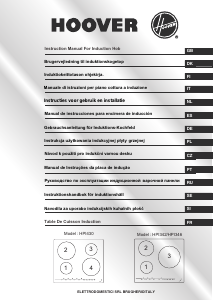
Käyttöohje Hoover HPI430 Keittotaso

Liittyvät tuotteet

Aiheeseen liittyvät luokat

×
Download