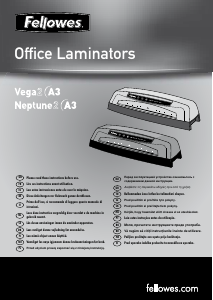
Käyttöohje Fellowes Neptune 3 A3 Pinnoituskone

Tarvitsetko käyttöoppaan Fellowes Neptune 3 A3 Pinnoituskone? Alta voit katsoa ja ladata suomenkielisen PDF-oppaan ilmaiseksi. Tällä tuotteella on tällä hetkellä 0 usein kysyttyä kysymystä, 11 kommenttia ja 8 ääniä, joiden keskimääräinen tuotearvio on 38/100. Jos tämä ei ole haluamasi käyttöopas, ota meihin yhteyttä.

Onko tuotteessa vika, eikä käyttöoppaasta ole apua? Siirry Repair Café ‑alueelle etsimään ilmaisia korjauspalveluita.

Käyttöohje

Loading…
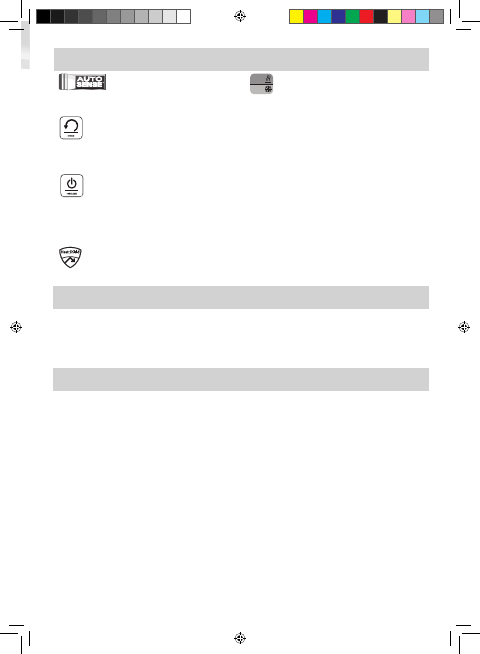
FEATURES & TIPS
AutoSense
Unique system detects pouch thickness and self-adjusts
to optimal lamination setting.
’Reverse’ function
To eject the laminating pouch during use, press and hold
down the reverse button until the pouch has ejected
from the machine.
‘Sleep Mode’ function
If the machine is not active for 30 minutes, the ‘Sleep
Mode’ function will place the machine into standby
mode. To operate the machine, press the ‘Power On
button on the control panel.
HeatGuard Technology
Keeps the laminator surface comfortable to the touch.
Auto
Cold
Auto (Hot)/Cold
The Auto (hot)/cold button is used to toggle back and
forth between hot and cold laminating.
• For best results, use Fellowes ® brand pouches:
Enhance 80, Impress 100, Capture 125, Protect
175 (Enhance 80 - cold pouch).
• This machine does not need a carrier to laminate.
It is a carrier-free mechanism.
• Always put the item to be laminated into the
appropriate sized pouch.
• Always test laminate with a similar size and
thickness before final process.
• Prepare pouch and item for lamination. Place
item within pouch centred and touching the
leading sealed edge. Ensure the pouch is not too
large for the item.
• If required, trim excess material from around the
item after lamination and cooling.
5
BEFORE LAMINATING
Ensure the machine is on a stable surface.
Check there is enough clear space (min 50cm)
behind the machine to allow items to pass through
freely.
Plug the machine into an easily accessible mains
socket. Switch the mains supply on.
Fit the Exit Tray to the rear of the machine.
STEPS TO LAMINATE
Switch the power on (located at the rear right side of
the machine).
The Standby button will turn on with a soft blue
glow.
Press the ‘Standby’ button on the control panel. The
Auto display and entry tray lights will flash. The auto
display will turn solid and a beep will sound when
the laminator is ready.
The machine will automatically warm-up to the hot
pouch (auto) setting. Note: the laminator features
AutoSense which automatically recognises the
pouch thickness you insert into the laminator. The
laminator automatically adjusts for hot pouches from
75 micron to 175 micron.
For cold lamination, press the Auto (hot)/cold button.
The cold display and entry tray lights will flash.
When the laminator is ready for cold lamination the
cold display will turn solid and a beep will sound.
Note: to use the cold setting after hot lamination you
may have to wait for the laminator to cool down for
30 – 60 minutes.
To switch back to hot pouch laminating after cold
laminating, press the Auto (hot)/cold button.
Place the pouch, sealed edge first, into the pouch /
document entry. Keep the pouch straight and central
within the document entry, not on an angle. Use the
entry markings as a guide.
Upon exit, the laminated pouch is hot and soft.
Remove the pouch immediately. Place pouch onto a
flat surface to cool. This helps prevent any jamming.
1.
2.
3.
5.
6.
7.
8.
9.
10.
11.
4.
12.
407559B_EUR_Neptune3_v1.4_A5.indd 5 9/24/2013 8:27:54 AM
Lataa käyttöohje suomalainen (PDF, 10.3 MB)
(Mieti ympäristöä ja tulosta tämä käyttöopas vain, jos se on todella tarpeen)

Loading…

Arviointi

Kerro meille mielipiteesi Fellowes Neptune 3 A3 Pinnoituskone arvioimalla tuote. Haluatko jakaa tuotekokemuksesi tai kysyä kysymyksen? Jätä kommentti sivun alalaidassa.
Oletko tyytyväinen kohteeseen Fellowes Neptune 3 A3 Pinnoituskone?
Kyllä Ei
38%
62%
8 äänet

Keskustele tuotteesta

Täällä voit jakaa mielipiteesi Fellowes Neptune 3 A3 Pinnoituskone:sta. Jos sinulla on kysyttävää, lue ensin huolellisesti käyttöohje. Käsikirjaa voi pyytää yhteydenottolomakkeellamme.

Maria VOSS 08-04-2022
Hei, Paperi on juuttunut laminointikoneeseen ja on kokonaan koneen sisällä. Onko mitään keinoa saada se pois?

vastaa | Tästä oli apual (50) Lue lisää (Googlen kääntämä)
Rachel 13-08-2022
Omani teki saman tänään! En saa sitä pois

Tästä oli apual (33) (Googlen kääntämä)
Pien Van Vessem 15-09-2020
Laminoin ennen koulussa, mutta nyt jotain on jumissa ja palanut enkä jaksa enää laminoida...

vastaa | Tästä oli apual (26) (Googlen kääntämä)
Sigrid Danay 12-11-2020
Folio on jumissa. Kuinka voin avata laitteen ja poistaa ne manuaalisesti?

vastaa | Tästä oli apual (25) (Googlen kääntämä)
Michel Hour 17-02-2020
A3:ssa asiakirjat tulevat ulos käpristyneinä eivätkä litteinä taskujen merkistä ja paksuudesta riippumatta. A4:ssä näitä ongelmia on vähemmän.

vastaa | Tästä oli apual (5) Lue lisää (Googlen kääntämä)
Francis DAUPHIN 21-02-2020
Mitä paperilaatua käytät? Minkä merkkisiä ja laadukkaita pusseja käytät? Eikö huoneen kosteus ole liian korkea? Joskus myös hihat ovat huonolaatuisia. Neptunuksella lämmön hajoaminen on säännöllistä. ehkä käytä suurempaa paksuutta välttääksesi gondolit...?

Tästä oli apual (2) (Googlen kääntämä)
Francis DAUPHIN 21-02-2020
Erittäin tehokas tuote! Pro laatua! Älä epäröi valita käytettävää holkkia suurempaa paksuutta, jos laminaat sivuja, jotka ovat paksumpia kuin 80 g. Mitä enemmän kone lämpenee, sitä enemmän värejä erottuu. Hieno tuote! Kaikille laminaattoreille paras puhdistus on erittäin paksun paperin tai kevyen pahvin pujottaminen koneen läpi maksimiin lämmitetyn koneen läpi, jotta saadaan talteen liimajäämät, jotka väistämättä vuotavat taskujen yli.

vastaa | Tästä oli apual (0) (Googlen kääntämä)

Loading…

Teija Vaihinen 29-01-2023
Laminoitu tasku jäi sisälle. Missä voisi yrittää korjautta ? Asun Turussa.

vastaa | Tästä oli apual (0)
Gré van der Putten 16-05-2024
Laite ei kuumene tarpeeksi. jos haluan leikata A4:n, se antaa mennä. Näin ei ollut aiemmin. Mikä menee pieleen?

vastaa | Tästä oli apual (0) (Googlen kääntämä)
Gré van der Putten 16-05-2024
Laite ei kuumene tarpeeksi. jos haluan leikata A4:n, se antaa mennä. Näin ei ollut aiemmin. Mikä menee pieleen? Etkö mahdu 2 A4-arkkia yhteen laminointiarkkiin?

vastaa | Tästä oli apual (0) (Googlen kääntämä)
Mag 13-01-2026
hei, Löysin lasinpalasia laminaattorista. Mikä osa siinä on? Näin videon avoimesta Neptune 3:sta, enkä näe tässä materiaalissa mitään elementtejä.

vastaa | Tästä oli apual (0) (Googlen kääntämä)

Lisää tästä ohjekirjasta

Ymmärrämme, että on mukavaa, että sinulla on paperikäyttöinen käyttöopas laitteellesi Fellowes Neptune 3 A3 Pinnoituskone. Voit aina ladata oppaan verkkosivuiltamme ja tulostaa sen itse. Jos haluat alkuperäisen käyttöoppaan, suosittelemme ottamaan yhteyttä osoitteeseen Fellowes. He saattavat pystyä toimittamaan alkuperäisen ohjekirjan. Etsitkö laitteen Fellowes Neptune 3 A3 Pinnoituskone käyttöopasta toisella kielellä? Valitse haluamasi kieli kotisivuiltamme ja etsi mallinumero nähdäksesi, onko sitä saatavilla.

Tekniset tiedot

Tuotemerkki Fellowes
Malli Neptune 3 A3
Kategoria Pinnoituskoneet
Tiedostotyyppi PDF
Tiedoston koko 10.3 MB

Kaikki käsikirjat kohteelle Fellowes Pinnoituskoneet
Lisää Pinnoituskoneet käsikirjoja
Käyttöohje Fellowes Neptune 3 A3 Pinnoituskone

Liittyvät tuotteet

Aiheeseen liittyvät luokat

×
Download