Käyttöohje Fellowes Helios 60 Thermal Nitoja

Tarvitsetko käyttöoppaan Fellowes Helios 60 Thermal Nitoja? Alta voit katsoa ja ladata suomenkielisen PDF-oppaan ilmaiseksi. Tällä tuotteella on tällä hetkellä 0 usein kysyttyä kysymystä, 0 kommenttia ja 0 ääntä. Jos tämä ei ole haluamasi käyttöopas, ota meihin yhteyttä.

Onko tuotteessa vika, eikä käyttöoppaasta ole apua? Siirry Repair Café ‑alueelle etsimään ilmaisia korjauspalveluita.

Käyttöohje

Loading…
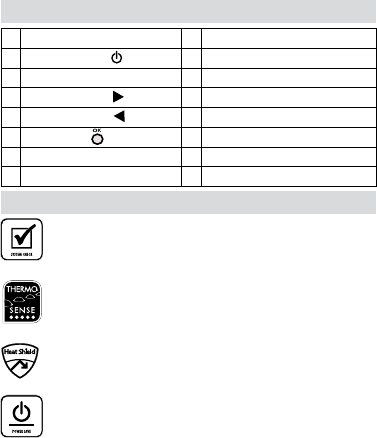
‘System-Check’ function
When switched on, the machine performs a
‘System-Check’ function. The control panel
illuminates LED neons in sequence to check their
operation.
‘Thermo Sense’ function
When opening the document clamp and loading
documents for binding, the machine calculates the
optimum binding cycle period. There is no need to
manually input the cycle period.
‘Heat-Shield’ function
The document clamp operates as a ‘Heat Shield’ to
prevent operators from accidentally touching the
heating plate.
Auto-Off’ function
If the machine is not active for 30 minutes, the
Auto-Off’ function will place the machine into
standby mode. The ’Power-On’ LED will flash
red and green. To operate the machine, press the
‘Power-On’ button.
• Always put the document into the appropriate sized
binding cover.
• For better results, consider including blank sheets
to fill the thermal cover to capacity.
• Always test bind with a similar size and thickness of
thermal covers before final process.
• Helios has an angled heater mechanism to ensure
correct document alignment with the document
support during the binding process.
• For best results, use Fellowes® brand supplies.
• Thermal binding covers work best with thin and
uncoated types of paper. Care should be taken
with thick and coated papers to ensure satisfactory
results.
• If the sheets have not been glued completely to the
cover, the document can be re-processed to improve
the result.
• Ensure the sheets are well aligned and touching
the glued spine of the thermal cover by tapping the
collated document in the cover onto a flat surface.
This can be done before and after the binding
process.
A On/off switch (rear side) I Lid lock (2)
B Power On button & LED J Binding channel
C Binding thickness guide K Document support
D Timer selection (increase) L Illuminated user interface
E Timer selection (decrease) M Cooling vents
F Select / OK button N Document clamp (binding)
G Thickness setting / timer selection O Cooling rack
H Lid
BINDING MACHINE CONTROLS
FEATURES & TIPS
5
Lataa käyttöohje suomalainen (PDF, 1.58 MB)
(Mieti ympäristöä ja tulosta tämä käyttöopas vain, jos se on todella tarpeen)

Loading…

Arviointi

Kerro meille mielipiteesi Fellowes Helios 60 Thermal Nitoja arvioimalla tuote. Haluatko jakaa tuotekokemuksesi tai kysyä kysymyksen? Jätä kommentti sivun alalaidassa.
Oletko tyytyväinen kohteeseen Fellowes Helios 60 Thermal Nitoja?
Kyllä Ei
Arvostele tuote ensimmäisenä
0 äänet

Keskustele tuotteesta

Täällä voit jakaa mielipiteesi Fellowes Helios 60 Thermal Nitoja:sta. Jos sinulla on kysyttävää, lue ensin huolellisesti käyttöohje. Käsikirjaa voi pyytää yhteydenottolomakkeellamme.

Lisää tästä ohjekirjasta

Ymmärrämme, että on mukavaa, että sinulla on paperikäyttöinen käyttöopas laitteellesi Fellowes Helios 60 Thermal Nitoja. Voit aina ladata oppaan verkkosivuiltamme ja tulostaa sen itse. Jos haluat alkuperäisen käyttöoppaan, suosittelemme ottamaan yhteyttä osoitteeseen Fellowes. He saattavat pystyä toimittamaan alkuperäisen ohjekirjan. Etsitkö laitteen Fellowes Helios 60 Thermal Nitoja käyttöopasta toisella kielellä? Valitse haluamasi kieli kotisivuiltamme ja etsi mallinumero nähdäksesi, onko sitä saatavilla.

Tekniset tiedot

Tuotemerkki Fellowes
Malli Helios 60 Thermal
Kategoria Nitojat
Tiedostotyyppi PDF
Tiedoston koko 1.58 MB

Kaikki käsikirjat kohteelle Fellowes Nitojat
Lisää Nitojat käsikirjoja
Käyttöohje Fellowes Helios 60 Thermal Nitoja

Liittyvät tuotteet

Aiheeseen liittyvät luokat

×
Download