Käyttöohje Clas Ohlson VE704 HDMI-sovitin

Tarvitsetko käyttöoppaan Clas Ohlson VE704 HDMI-sovitin? Alta voit katsoa ja ladata suomenkielisen PDF-oppaan ilmaiseksi. Tällä tuotteella on tällä hetkellä 1 usein kysytty kysymys, 0 kommenttia ja 0 ääntä. Jos tämä ei ole haluamasi käyttöopas, ota meihin yhteyttä.

Onko tuotteessa vika, eikä käyttöoppaasta ole apua? Siirry Repair Café ‑alueelle etsimään ilmaisia korjauspalveluita.

Käyttöohje

Loading…
English
GREAT BRITAIN
customer service tel: 08545 300 9799 e-mail: [email protected]
internet: www.clasohlson.com/uk
Ver. 20130617
VGA to HDMI Adaptor
Art.no 38-4705 Model VE704
Please read the entire instruction manual before using the product and save it for future reference.
We reserve the right for any errors in text or images and any necessary changes made to technical data.
If you have any questions regarding technical problems please contact our customer services.
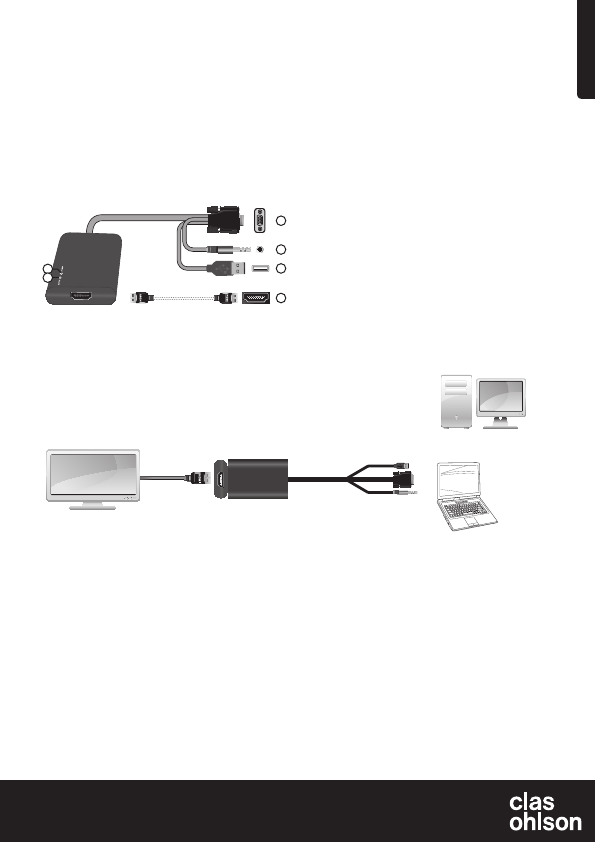
1. Power LED indicator is lit when the adaptor is connected and
has power.
2. Active LED indicator is lit when there is an existing incoming signal.
3. HDMI outlet (HDMI lead sold separately)
4. USB plug (receives power from the mains adaptor)
5. 3.5 mm stereo plug
6. VGA plug
Connections
Connection example:
Make sure the devices are turned off before connecting.
Laptop connection
Ordinarily, one needs to activate an extra display in order for the adaptor to work. There are several different ways of doing this. For instructions
concerning your particular operating system, see below.
Note: These are only general examples. Settings for individual computers and their graphics card may vary.
Windows XP
Right click on an open area of your desktop and select Properties. Click on the Settings tab and select Advanced. Click on the tab with settings
for your graphics card. Go into display settings to configure several displays and set the desired settings for your extra display.
Windows Vista
Hold down the [Windows] button on your keyboard, then press [X]. This will open the Windows Mobility Centre on your computer. Click Connect
display in the external display box. A dialogue box will appear asking how you wish to use the external display. Select Mirrored.
Windows 7
Hold down the [Windows] button on your keyboard, then press [P]. A dialogue box will appear asking how you wish to use your external display.
Select Mirrored.
Troubleshooting
Check the following if no image appears on your TV after connecting all cables:
Make sure that the drive routine for your graphics card is up to date. If your drive routine isn’t up to date you may experience bad image quality or
noimage at all.
Disposal
Follow local ordinances when disposing of this product. If you are
unsure about how to dispose of this product contact your municipality.
Specifications
HDCP compatible
Supported operating systems Windows XP/Vista (32/64)
and Windows 7 (32/64)
Supported screen resolution 800×600, 1024×768, 1280×768
1280×1024
Make sure your screen supports the stated resolutions before
connecting the device to the adaptor.
Plugs and connections
• Male VGA plug
• 3.5 mm stereo plug
• USB plug (receives power from the adaptor)
• Female HDMI socket (HDMI A)
Description
• Connects computers with a standard VGA output to modern TVs,
projectors or monitors with a HDMI input.
• Supports HD video and audio via the HDMI output.
• Connects to both VGA and 3.5 mm audio outputs from your
computer. No drive routines required.
PC
Laptop
AUDIO
USB
or
VGA
HDMI
HDTV
3
4
5
6
1
2
HDMI lead sold separately.
Lataa käyttöohje suomalainen (PDF, 2.84 MB)
(Mieti ympäristöä ja tulosta tämä käyttöopas vain, jos se on todella tarpeen)

Loading…

Arviointi

Kerro meille mielipiteesi Clas Ohlson VE704 HDMI-sovitin arvioimalla tuote. Haluatko jakaa tuotekokemuksesi tai kysyä kysymyksen? Jätä kommentti sivun alalaidassa.
Oletko tyytyväinen kohteeseen Clas Ohlson VE704 HDMI-sovitin?
Kyllä Ei
Arvostele tuote ensimmäisenä
0 äänet

Keskustele tuotteesta

Täällä voit jakaa mielipiteesi Clas Ohlson VE704 HDMI-sovitin:sta. Jos sinulla on kysyttävää, lue ensin huolellisesti käyttöohje. Käsikirjaa voi pyytää yhteydenottolomakkeellamme.

Lisää tästä ohjekirjasta

Ymmärrämme, että on mukavaa, että sinulla on paperikäyttöinen käyttöopas laitteellesi Clas Ohlson VE704 HDMI-sovitin. Voit aina ladata oppaan verkkosivuiltamme ja tulostaa sen itse. Jos haluat alkuperäisen käyttöoppaan, suosittelemme ottamaan yhteyttä osoitteeseen Clas Ohlson. He saattavat pystyä toimittamaan alkuperäisen ohjekirjan. Etsitkö laitteen Clas Ohlson VE704 HDMI-sovitin käyttöopasta toisella kielellä? Valitse haluamasi kieli kotisivuiltamme ja etsi mallinumero nähdäksesi, onko sitä saatavilla.

Tekniset tiedot

Tuotemerkki Clas Ohlson
Malli VE704
Kategoria HDMI-sovittimet
Tiedostotyyppi PDF
Tiedoston koko 2.84 MB

Kaikki käsikirjat kohteelle Clas Ohlson HDMI-sovittimet
Lisää HDMI-sovittimet käsikirjoja

Usein kysytyt kysymykset kohteesta Clas Ohlson VE704 HDMI-sovitin

Tukitiimimme etsii hyödyllisiä tuotetietoja ja vastaa yleisiin kysymyksiin. Jos huomaat yleisissä kysymyksissä virheen, kerro siitä meille yhteydenottolomakkeella.

Mitä HDMI tarkoittaa? Todennettu

HDMI on lyhenne sanoista High-Definition Multimedia Interface. HDMI on liitäntä korkealaatuisen videon ja äänen lähettämiseen laitteesta toiseen.

Tästä oli apual (2) Lue lisää
Käyttöohje Clas Ohlson VE704 HDMI-sovitin

Liittyvät tuotteet

Aiheeseen liittyvät luokat

×
Download